
In a typical subdivision, irregular geometry can leave unrealized space that reduces overall efficiency. The Flexible Parcels feature allows the solver to handle non-rectangular parcels, maximizing tricky irregular sites and improving results at corners — without requiring manual adjustments to your layout.
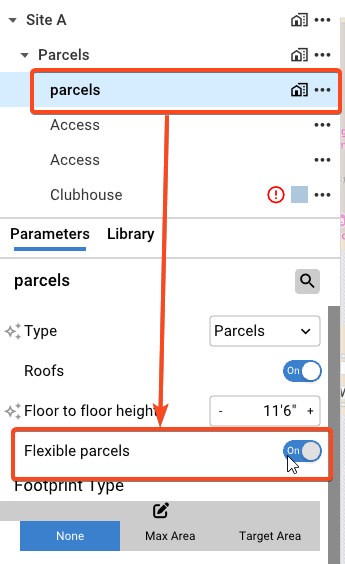
To activate Flexible Parcels:
- Select the Parcel layer.
- Toggle on Flexible Parcels.
Once enabled, the individual parcel settings panel will update to give you more control:
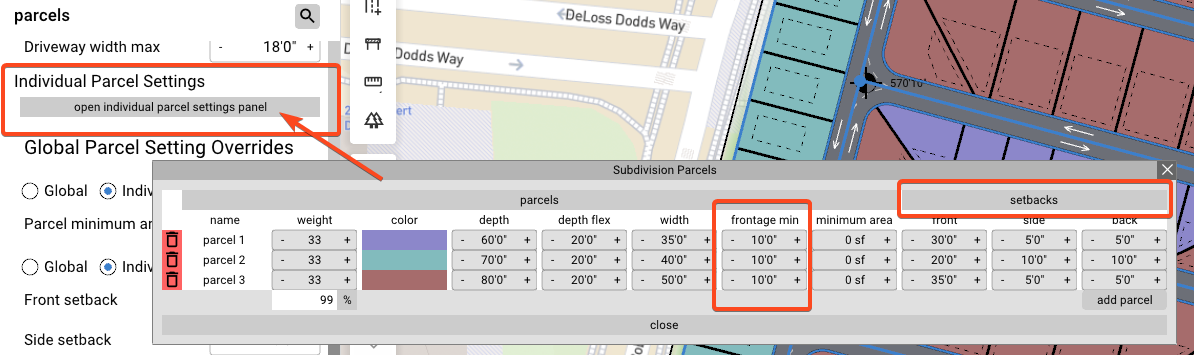
- Minimum Frontage — Set a minimum frontage value while allowing parcels to flex toward the rear, ensuring you are maximizing the full depth of the site.
- Setbacks — Set front, side, and back setbacks directly, without needing to define a max, target, or static footprint.
Flexible Parcels is particularly effective on corner lots and sites with irregular boundaries where standard rectangular solving would leave gaps.