
Path Offset Tool
The new path offset tool allows you to define spaces from a centerline instead of manually defining each edge. You draw the path, then apply an offset to generate the space footprint around it. The offset value is adjustable at any time: drag a handle to set it visually, or type in a specific value when you need precision. Because the geometry is driven by the centerline rather than a manually constructed outline, you get direct control over the space's width relative to the path, and every adjustment is immediate and non-destructive.
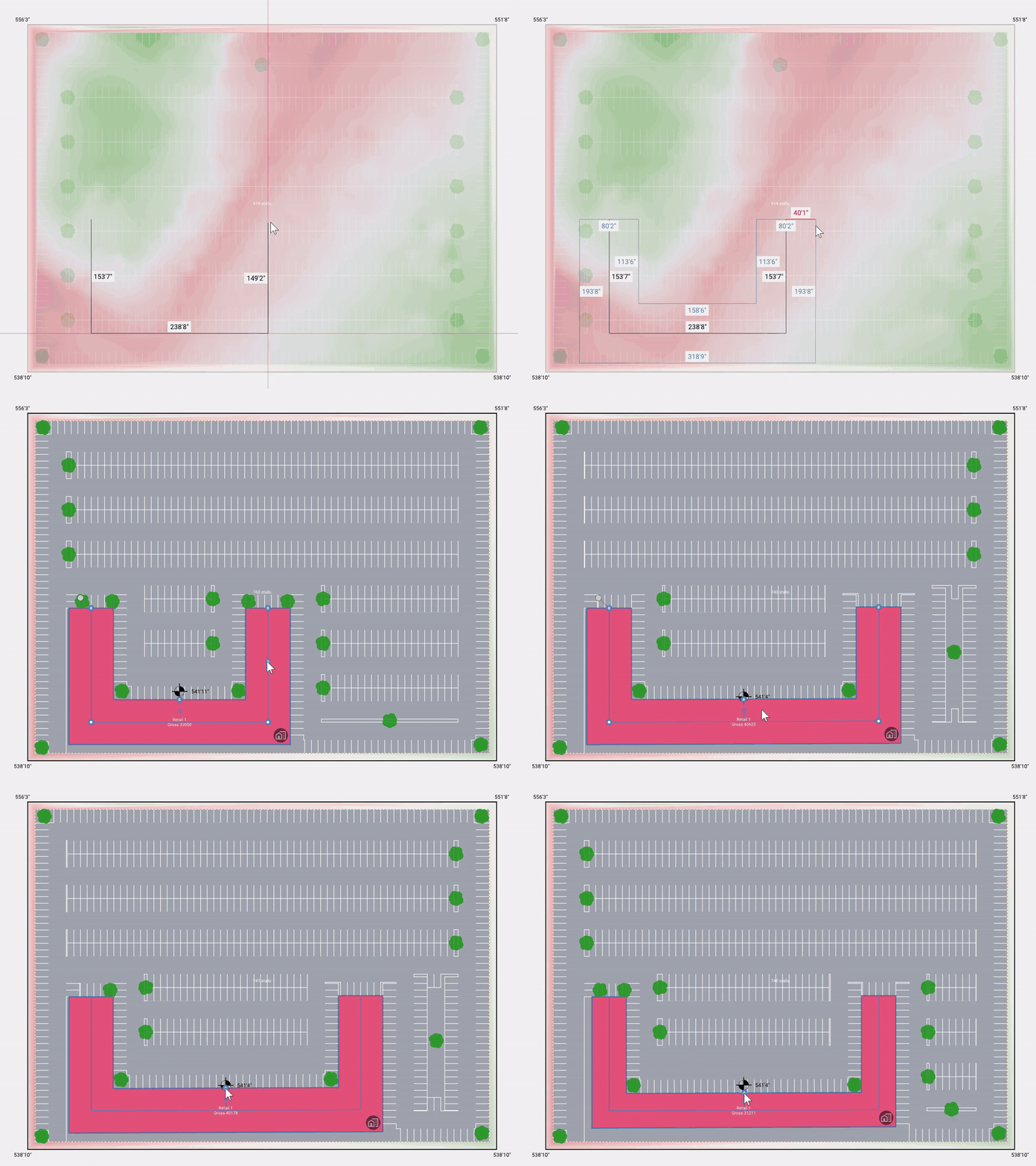
The result is accurate, editable spaces that match real-world conditions like corridors, setbacks, and linear programs. Since the offset can be revised at any point in the design.
See a detailed walkthrough in the Path Offset article.
Parcel Information on Hover
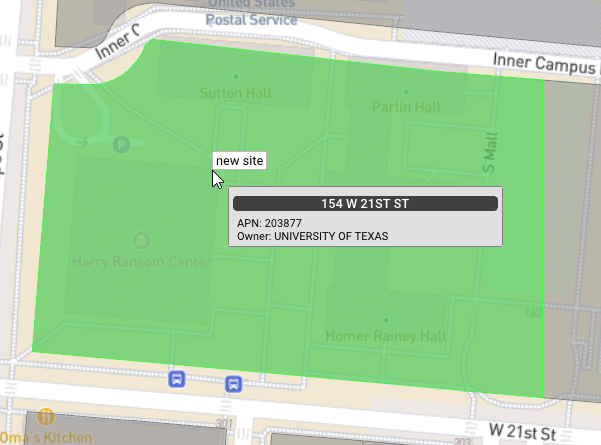
During site definition, hovering over a parcel now surfaces its address, APN, and owner before you select it.
Location Anchor for Inline Spaces and Access
When you place an inline space or parking access area, a new location anchor setting lets you specify whether it anchors to the front, side, or rear of the defined site at the time of placement. Placement becomes intentional and controlled: rather than adjusting elements after the fact, you define the anchor relationship upfront, and the element responds to the site geometry accordingly.
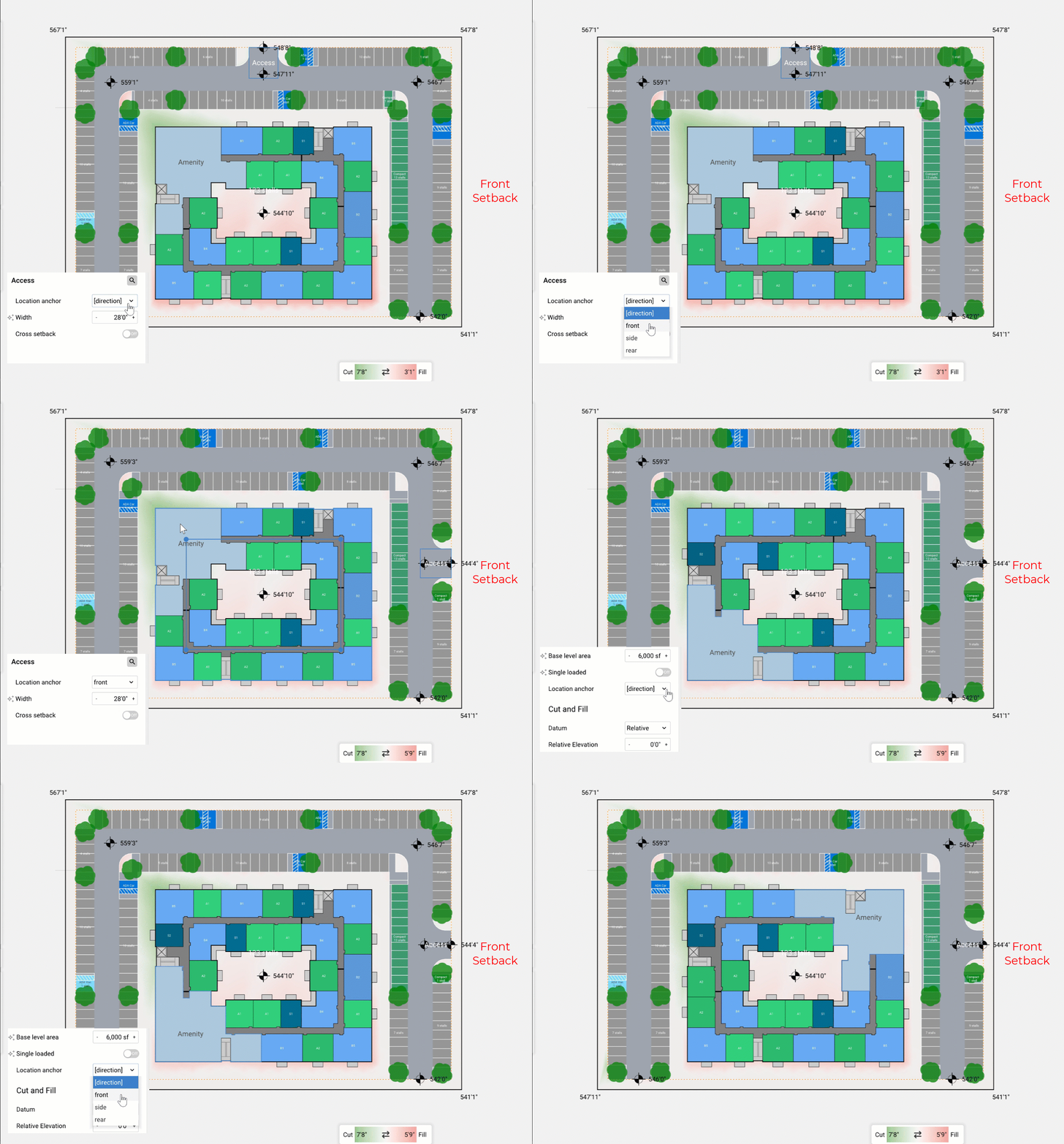
Design iterations move faster as a result. Less time goes into repositioning elements by hand and more into exploring configurations, with confidence that each placement reflects the site relationship you intended.
Details:
- Added Canvas Labels toggles to the Labels panel to show or hide unit, parking, easement, parcel, and warehouse-space labels.
- Added a Flip Angle button to the manual mode parking popup for angled-stall drives, letting users flip which way the stalls lean along a selected spine.
- Added a rectangle tool for drawing a site boundary in two clicks.
- The map hover tooltip now follows the cursor.
- Export Pro Forma reports as multi-page PDFs, with version history and re-download.
- Reports are now using scalable SVGs instead of pixel based images in PDF export.
- Create, rename, and move asset folders and assets.
Reported Issues & Bug Fixes:
- Removed the duplicate disable SD parcel labels preference, superseded by the per-project parcel labels toggle.
- Fixed a crash when editing the boundary of a complex sliced site.
- Fixed Slice Site silently doing nothing on complex curved sites.
- Raised the maximum drive aisle turn radius from 40' to 50'.
- Added elevation contour lines to the SVG export.
- Inline spaces now anchor toward the FRONT setback edge by default.
- Fixed being unable to drag, move, or rotate a sliced site with a sliver edge.
- Lower levels now appear in the SVG export, faded to match the in-app render.
- Added vector data layers to the SVG export.
- Fixed some power utilities showing incorrect titles on hover.
- Restored the maximum parking stall depth to 75 ft.
- Increased the maximum wrap levels from 15 to 100.
- Fixed the Draw Axis tool producing an invalid drive axis when clicked without dragging.
- Save Preset now suggests a better default name when a preset-applied site or a single root layer is selected.
- Fixed the move and rotate handle missing on sliced sites.
- Fixed dragging a shared edge of a sliced site leaving the neighboring site's edge behind.
- Removed the large sites preference; it is now always enabled.
- Fixed a crash when switching a garden with no unit categories to unit mix.
- Garden, parcel footprint, and unit floors can now go up to 50.
- Easements now have right-click menu options and can be moved by dragging.
- Fixed oversized parking stalls in rows split by stairs or cores.
- Fixed flood-zone overlay settings resetting to defaults when reopening a project.
- Fixed parking shortfalls when multiple warehouses share a row.
- Reduced over-aggressive warehouse-to-parking swaps on multi-warehouse rows.
- Fixed warehouses extending past the site boundary when side parking didn't fit the row.
- Fixed undo/redo for the easement Allow Roads and Parking toggle.
- Fixed pavement spreading beyond the parking field when a drive aisle's endpoint grazes the site boundary at a shallow angle.
- Renamed the manual mode parking Flip button to Flip Loading.
- Fixed disabled sides of a manual mode parking spine still receiving double-loaded stalls from an adjacent spine.
- Fixed parking stall angles flipping on rows after an unrelated manual edit, such as extending a different spine.
- Fixed angled parking rows staying single-loaded where they could geometrically fit double-loaded.
- Fixed Data tab layer nodes being hidden after dismissing the address picker without selecting a candidate.
- Fixed missing drive aisles in irregular interior parking areas.
- Drive-thru connection and assembly part clipping errors no longer draw an icon on the canvas; they still appear in the errors panel.
- Drive-thru layers now appear in the layer tree under their parent assembly and can be selected or deleted from the site view.
- Fixed image rescaling in assembly editor resulting in invalid state.
- Fixed the Draw Vehicle Path tool clearing the layer selection on activation and placing the new layer at the wrong parent.
- Fixed external circulation occasionally not respecting the configured max block length.
- Fixed an in-progress road occasionally disappearing while drawing.
- Fixed missing drive aisles when two spine objects share an apex vertex near an obstruction.
- Fixed overlapping stair and lift placement in garage cores.
- Crossroads on parallel drive aisles now line up when possible.
- Fixed resetting mix weights with all weights at zero corrupting the mix.
- Fixed undo/redo not registering moves of a rectangular-fill layer's length-side anchor.
- Fixed undo of applying a saved view from 2D leaving the wrong view selected.
- Fixed undo of resetting mix weights losing precision in per-target weights.
- Fixed undo for housing parcel min-area and global min-area changes.
- Fixed undo/redo not registering changes to layer indent depth.
- Fixed undo of resetting a rectangular-fill layer's anchor.
- Fixed undo of toggling area-by-percent on in-warehouse layers.
- Fixed undo of toggling the warehouse align-spaces option.
- Fixed crashes in flexible parcel sites with connector spacing or max block length constraints.
- Improved flexible parcel layouts on irregular and corner-heavy sites, including better corner clipping and sliver handling.